
CMMC Compliance File Sharing
Give your team secure remote access to Controlled Unclassified Information while it stays on your own Windows file servers. The Cybersecurity Maturity Model Certification (CMMC) is the Department of Defense framework that verifies whether contractors protect government information at the level their contracts require, and it became enforceable in DoD contracts in November 2025.
MyWorkDrive lets organizations implement CMMC compliance file sharing on their existing Windows file server infrastructure, adding the security controls assessors look for without migrating files to a proprietary cloud sync or share service.
Quick answer
CMMC compliance file sharing means giving authorized users access to Controlled Unclassified Information under the security controls that NIST SP 800-171 requires. MyWorkDrive supports those controls while CUI stays on storage you control, so DoD contractors can meet CMMC Level 2 expectations without copying files into a third-party cloud.


What CMMC Means for Your File Sharing in 2026
CMMC became a binding contract requirement in November 2025, and the enforcement path shifted in July 2026.
CMMC builds on standards contractors already work with, organized into three levels. Level 1 covers the 15 safeguarding requirements in FAR 52.204-21 for organizations that handle only Federal Contract Information. Level 2 covers all 110 requirements of NIST SP 800-171 for organizations that handle CUI, which is the level that applies to most file sharing scenarios involving sensitive defense data. Level 3 layers on enhanced requirements from NIST SP 800-172 for the highest priority programs.
Any system that stores, processes, or transmits CUI is in scope, which puts your file servers and your remote access method squarely inside the assessment boundary. MyWorkDrive lets you build that file access on your existing Windows infrastructure and helps you implement and evidence the controls assessors look for. For the broader picture across regulations, see our compliance overview and our government file sharing solutions.
Keep CUI Inside Your Own Boundary
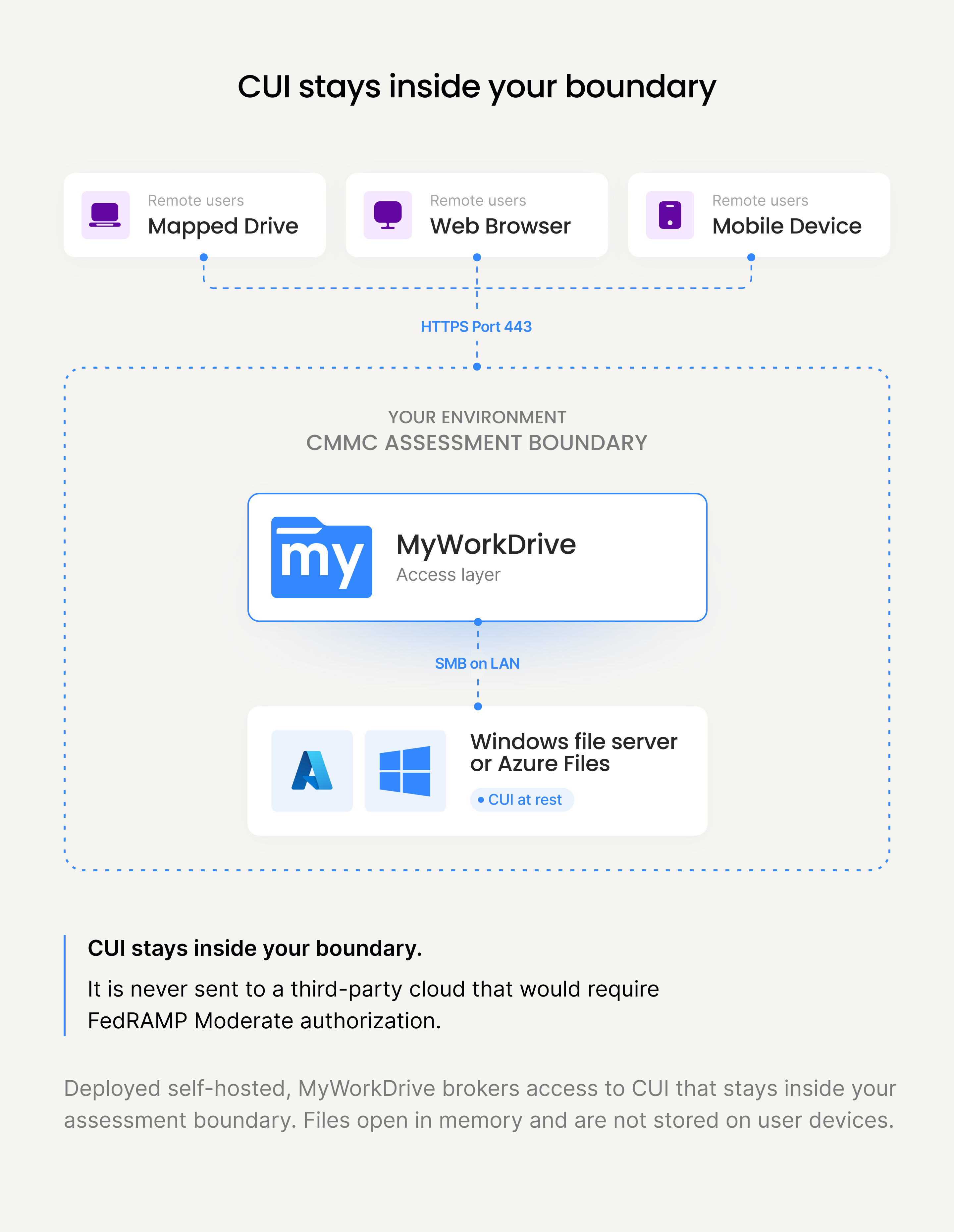
For any cloud file sharing tool in the defense space, the first question an assessor asks is where the CUI actually lives.
Under DFARS 252.204-7012, when an external cloud service provider stores, processes, or transmits CUI on your behalf, that provider has to meet the FedRAMP Moderate baseline or demonstrate equivalency. That requirement pushes many contractors toward expensive government cloud tenants such as Microsoft 365 GCC High.
MyWorkDrive runs as software inside your own environment, so your files stay exactly where they are today, on your Windows file servers, in Azure Files, S3, or in storage you already control. Files are accessed in real time and open in memory on the user device. They are not synced or copied to endpoints, and no customer file content is stored on MyWorkDrive servers. Because the CUI never leaves your boundary and is never handed to a third-party multi-tenant cloud, the external FedRAMP authorization requirement does not apply to the file access layer. Read more about our data sovereignty architecture.
That keeps your assessment scope tighter and your data under your control. You remain responsible for ensuring the underlying storage and Windows environment meet the CMMC level your contract requires, and if you connect MyWorkDrive to a cloud storage backend you are responsible for that backend reaching the right authorization, for example Azure Government for CUI workloads. MyWorkDrive removes the need to migrate your files into someone else's cloud just to give people secure access.
Access follows Zero Trust principles: users authenticate per session and reach files at the application layer over a single secure port, without the broad network exposure of a legacy VPN. Organizations replacing VPN-based file access use MyWorkDrive as a VPN alternative for remote file access, with data loss prevention and security controls applied at the share, user, or global level.
CMMC Compliance File Sharing Checklist
The requirements for CMMC compliance related to file sharing are extensive. The summary table maps the NIST SP 800-171 control families most relevant to file access against what MyWorkDrive provides and what your organization owns. The detailed checklist below it collates the individual file sharing requirements for easy reference.
| 800-171 family | What the assessor expects for file sharing | How MyWorkDrive helps | Ownership |
|---|---|---|---|
| Access Control (AC) | Least privilege, limit access to authorized users, control remote access and sharing. | NTFS and access-based enumeration enforce least privilege so users see only what they are permitted to. Granular session timeouts, public link controls with expiration and passwords, and file type allow lists. | Shared |
| Identification & Authentication (IA) | Identify users, enforce multifactor authentication, apply password complexity. | Integrates with Active Directory and Microsoft Entra ID, with MFA enforced at the identity provider through Duo, SAML, ADFS, or Conditional Access. Supports the complex password policy built into Active Directory. | Customer-configured |
| Audit & Accountability (AU) | Log access and changes, attribute actions to users, retain and review audit records. | Logs all access, modifications, deletions, authentication, and admin actions with user and timestamp. Searchable and exportable, with Syslog forwarding to your SIEM and threshold alerts for unusual activity. | MyWorkDrive provides |
| System & Communications Protection (SC) | Protect CUI in transit, use FIPS-validated cryptography, control the system boundary. | TLS 1.2 and higher for all transmission. When Windows runs in FIPS mode, TLS uses the operating system FIPS-validated modules. Single port boundary, DMZ proxy support, and Cloudflare tunneling. | Shared |
| Media Protection (MP) | Limit and control CUI on portable media and endpoints, mark and handle sensitive content. | Data Loss Prevention with secure viewer mode, dynamic watermarking, and download or clipboard restrictions per share, user, or globally. Files open in memory and are not stored on endpoints. | MyWorkDrive provides |
| Configuration Management (CM) | Control devices that connect, restrict nonessential functions, manage the access surface. | Device approval blocks unapproved devices from connecting remotely, with visibility into last login and operating system. Native Windows IIS sites can be locked down to a hardened baseline. | Customer-configured |
| System & Information Integrity (SI) | Monitor for unauthorized activity, respond to alerts, control file actions. | File download, delete, and modification alerts, file type blocking, and compatibility with your antivirus. Shadow copy integration supports restoring previous versions of files. | Shared |
Detailed Requirement Checklist
Search and filter the individual CMMC file sharing requirements, with the corresponding CMMC level and NIST reference for each.
MyWorkDrive CMMC Compliant File Sharing Features
- MyWorkDrive supports the complex username and password requirements built into Active Directory as well as two-factor authentication.
- All data exchanged and transmitted is encrypted in transit with TLS 1.2 and higher.
- When Windows Server runs in FIPS mode, TLS connections use the operating system FIPS-validated cryptographic modules.
- MyWorkDrive fully supports accessing files encrypted with Windows Server file encryption for encryption at rest.
Using MyWorkDrive, organizations can provide secure file sharing access to their employees who meet the requirements of CMMC.
With native support for NTFS and Access-based enumeration, no login information or access to files is ever stored or used by MyWorkDrive. All file access is granted in the context of the currently logged-on user only. As an additional security precaution, we have designed MyWorkDrive so that it is not possible to grant more privileges to shares in MyWorkDrive than are already provisioned in Windows under NTFS. We inherit existing permissions, providing for least privilege access.
MyWorkDrive has been awarded the Skyhigh CloudTrust™ rating of "enterprise-ready" for its MyWorkDrive Secure FileShare remote access software. Skyhigh identifies and classifies thousands of cloud services and provides an objective and detailed evaluation of the enterprise-readiness of each cloud service based on a detailed set of criteria developed in conjunction with the Cloud Security Alliance (CSA).
Learn more →
Security Controls That Support Your CMMC Program
Every control below applies uniformly whether files live on Windows file servers, Azure Files, S3, SharePoint, or OneDrive.
Data Loss Prevention
MyWorkDrive helps organizations prevent file records from accidental deletion. If a user deletes any sensitive files, this information is logged. Since MyWorkDrive ties into Windows Server shadow copies, previous versions or deleted files can be restored easily. MyWorkDrive administrators can also enable our Data Loss Prevention (DLP) feature, which allows users to only edit or view, but not download or delete files at the share, user, or global system level.
Device Approval
Prevent unapproved devices from connecting to file shares remotely that have not been approved by the network administrator. View usage, last login, and operating system details for all clients. Learn more →
Data Retention and Archiving
MyWorkDrive allows customers to enable cloud access to files with existing data retention and archiving policies consistent with CMMC Compliance. Since no data is ever changed or stored by MyWorkDrive, existing backup software, archiving, and data retention procedures may be maintained or customized to meet the needs of the business.
Logging and Reporting
All access, modifications, deletions, and user activity are logged. Any file changes are logged with an audit trail and information about who changed the file and when (Date and Time) it was changed. Audit logs can be searched based on keywords or exported as needed for additional discovery and reporting, and may be integrated with standards-based syslog servers and SIEM platforms. MyWorkDrive supports alerts for file activities exceeding management thresholds.
Access Based Enumeration
MyWorkDrive integrates with the Windows Server Access Based File Enumeration feature. Users only see folders for files for which they have Active Directory permissions. This overrides any folder shares made available to them in MyWorkDrive and preserves least privilege access on the Windows file shares. This feature is enabled by default in MyWorkDrive and does not require manual or duplicate permissions management by the systems administrator.
File Access Security Controls
MyWorkDrive adds intelligence around access to Windows file shares remotely. Unlike VPNs, MyWorkDrive has numerous components that help enterprises enforce least privileged protection for critical company files from unauthorized access and data theft, including:
- File Type Blocking/Allow Lists for mapped drive clients
- File download, delete, and modification alerts
- Device Approval
- Data Leak Prevention Controls
- Extensive logging
- Two Factor Authentication
- TLS 1.2 and higher encryption support
- SAML/ADFS MFA Support
- Zero Trust Access provides access to Web, Mapped Drive or mobile clients over a single secure port
- Granular Session Timeouts
- Native Windows IIS sites are easily patched and locked down.
- MyWorkDrive fully supports being placed behind front-end proxy security appliances in the DMZ, as well as Cloudflare, to further enhance the protection and security of the MyWorkDrive Web File Access portal.
FIPS-Validated Cryptography and CMMC
For Level 2, NIST SP 800-171 control 3.13.11 requires FIPS-validated cryptography to protect the confidentiality of CUI.
About certificate #3018
MyWorkDrive has also been issued a FIPS 186-4 RSA algorithm validation certificate #3018 from the US Government National Institute for Standards and Technology (NIST). This is an algorithm validation from the Cryptographic Algorithm Validation Program, which is separate from and narrower than a FIPS 140 module validation. For your assessment, the FIPS-validated cryptography protecting CUI comes from the Windows environment running in FIPS mode.
FIPS-validated has a precise meaning: a cryptographic module validated through the NIST Cryptographic Module Validation Program under FIPS 140-2 or FIPS 140-3. Using a FIPS-approved algorithm on its own does not satisfy the control. In a MyWorkDrive deployment, that validation comes from the platform. MyWorkDrive runs on Windows Server, which provides CMVP-validated cryptographic modules, and when you enable FIPS mode in Windows, MyWorkDrive uses those validated modules for its TLS connections.
One timing detail matters for readiness planning: cryptographic modules validated under FIPS 140-2 moved to the historical list on September 21, 2026. That date comes from the NIST Cryptographic Module Validation Program transition schedule and was never tied to CMMC, so the Phase 2 suspension did not change it. Confirm the FIPS 140-3 status of the modules in your Windows environment as part of your assessment preparation.
Government agencies and contractors can deploy MyWorkDrive infrastructure on-premise as a 100% private cloud or as a hybrid cloud. In private cloud mode, all files, transmissions, and document edits are contained within the organization's infrastructure, including support for a local Office Online Server. When deployed as a hybrid cloud, Office documents can be viewed and edited securely in Microsoft's FedRAMP-authorized Office 365 environment, with a direct secure tunnel between the organization and Microsoft.
See CMMC-Ready File Access on Your Own Infrastructure
Walk through your shares and assessment questions with our team, or start a free trial on the Windows file servers you already run and have users connected in under an hour.
CMMC File Sharing FAQ
What is CMMC compliance file sharing?

CMMC compliance file sharing is the practice of accessing and sharing files that contain Controlled Unclassified Information under the safeguards NIST SP 800-171 requires, including multifactor authentication, FIPS-validated encryption in transit, audit logging, and least privilege access. MyWorkDrive supports these controls while files remain on Windows infrastructure the contractor controls.
Does MyWorkDrive make my organization CMMC compliant?
No single product makes an organization CMMC compliant. CMMC certification is assessed at the organization level against NIST SP 800-171. MyWorkDrive is the secure file access layer that helps you implement and evidence specific control families, including Access Control, Identification and Authentication, Audit and Accountability, and System and Communications Protection. You still own your System Security Plan and your assessment scope.
Can I keep CUI on-premise without moving to Microsoft GCC High?
Yes. MyWorkDrive provides remote and browser-based access to files that stay on your existing Windows file servers or in storage you control. Because Controlled Unclassified Information remains inside your own boundary and is never stored on MyWorkDrive servers, you can give users secure access without migrating data into a separate government cloud tenant. Many small and mid-size defense suppliers use this approach to avoid the cost and complexity of a full GCC High migration.
Is FedRAMP authorization required for CMMC file sharing?
FedRAMP applies when an external cloud service provider stores, processes, or transmits CUI on your behalf. Under DFARS 252.204-7012, that cloud service must meet the FedRAMP Moderate baseline or equivalency. When you deploy MyWorkDrive self-hosted, your CUI stays inside storage you control and is not handed to a third-party multi-tenant cloud, so the external FedRAMP authorization requirement does not apply to the file access layer. You remain responsible for ensuring any cloud storage you connect, such as Azure Government, meets your required CMMC level.
Does MyWorkDrive meet the FIPS-validated cryptography requirement in NIST 800-171 control 3.13.11?
Control 3.13.11 requires FIPS-validated cryptography, which means a cryptographic module validated through the NIST Cryptographic Module Validation Program under FIPS 140-2 or FIPS 140-3. MyWorkDrive runs on Windows Server, which provides those validated modules. When Windows is configured for FIPS mode, MyWorkDrive uses the operating system validated modules for TLS connections, so cryptography protecting CUI in transit relies on validated implementations. MyWorkDrive also holds a separate FIPS 186-4 RSA algorithm validation, certificate 3018, which is an algorithm validation distinct from a FIPS 140 module validation.
What CMMC level applies to file sharing?
Level 1 applies to contractors that handle only Federal Contract Information and covers 15 basic safeguarding requirements with annual self-assessment. Level 2 applies to contractors that handle Controlled Unclassified Information and covers the 110 requirements of NIST SP 800-171, including FIPS-validated cryptography. Most file sharing scenarios that involve CUI fall under Level 2. Level 3 adds enhanced requirements drawn from NIST SP 800-172 for the highest priority programs.
When is CMMC required in DoD contracts?
The CMMC program rule under 32 CFR Part 170 took effect December 16, 2024. The DFARS acquisition rule under 48 CFR took effect November 10, 2025, which began Phase 1 and made CMMC a binding contract requirement, starting with Level 1 and Level 2 self-assessments in applicable new solicitations. Phase 2, which would have added third-party Level 2 certification for most contractors handling CUI on November 10, 2026, was suspended on July 13, 2026. DARS Class Deviation 2026-O0025, Revision 3, issued September 3, 2026, keeps that suspension in acquisition instruction, so Level 1 and Level 2 requirements can be met through self-assessment while DFARS 252.204-7012 and NIST SP 800-171 Revision 2 still apply.
How does MyWorkDrive support CMMC audit and logging requirements?
MyWorkDrive logs all file access, modifications, deletions, authentication events, and administrator actions, with the user and timestamp recorded for each action. Audit logs can be searched, exported, and forwarded to standards-based Syslog and SIEM platforms, which gives you a single audit trail across Windows file servers, Azure Files, SharePoint, and OneDrive. This supports the Audit and Accountability control family in NIST SP 800-171.